Three steps, in order: a BingX key that can trade but never withdraw, tvhook sized and issuing a webhook, and TradingView firing a real strategy at that webhook. Real screens throughout, and a starter strategy at the end if you don't have one yet.
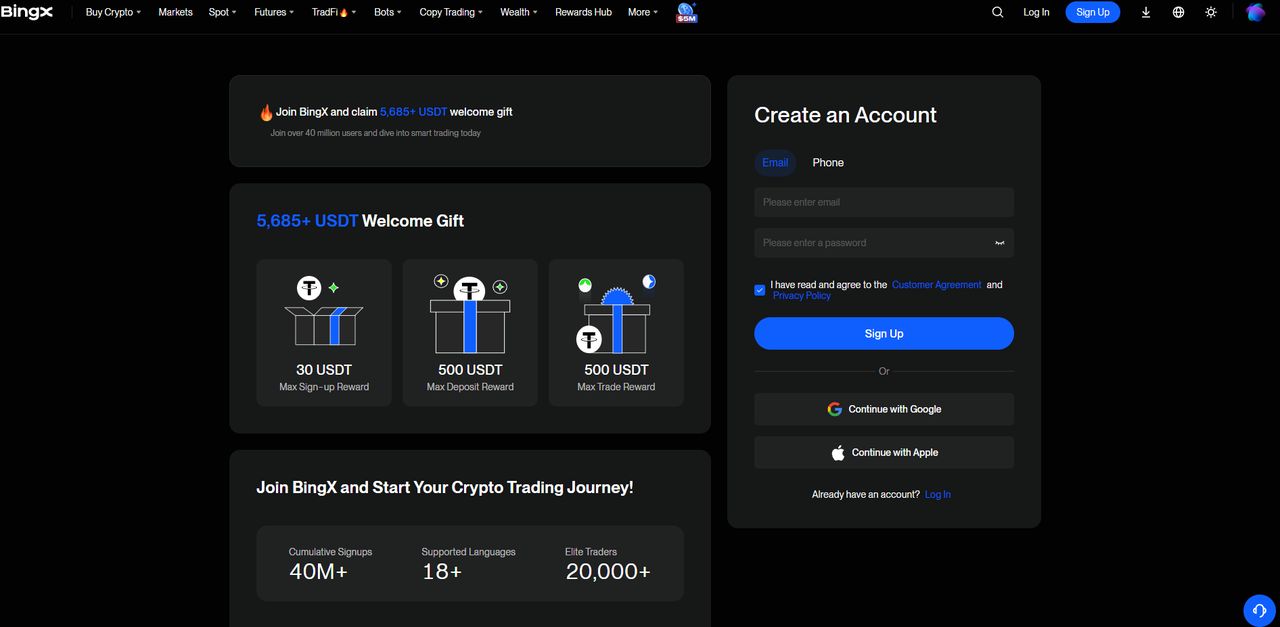
The tvhook referral link opens BingX's signup page directly — email or Google/Apple. Signing up this way is what makes webhook auto-trading free and knocks 10% off futures fees; there's no separate step for it.
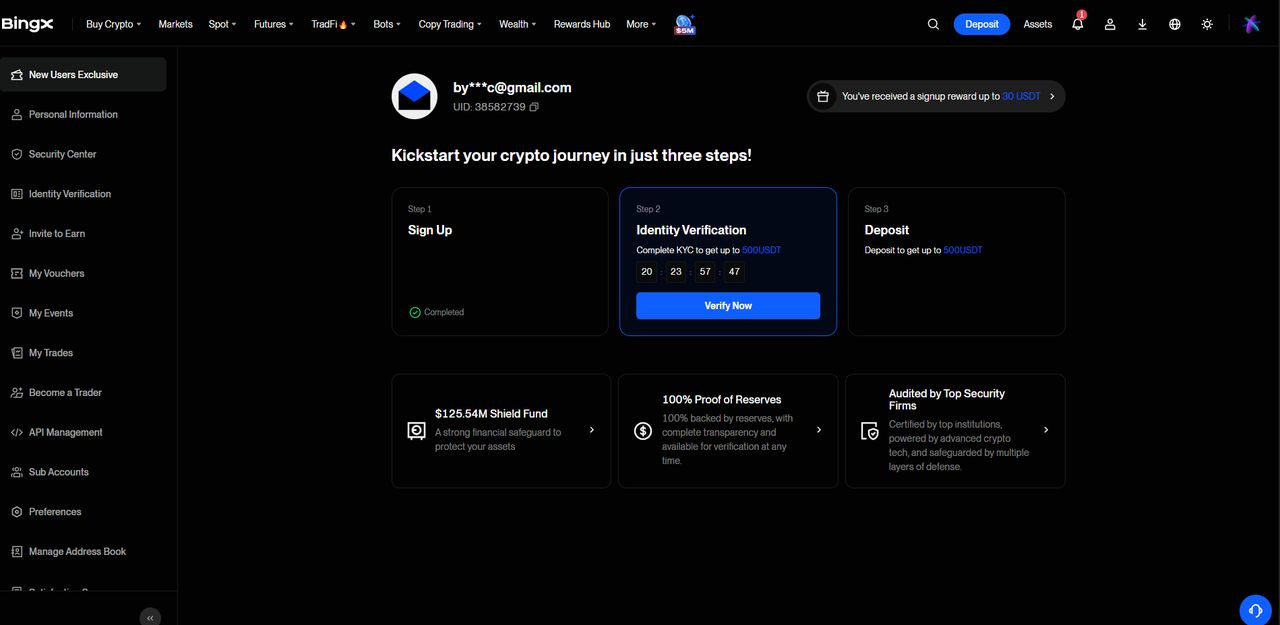
Three boxes, one of them matters
Right after signup BingX shows three steps: Sign Up (done), Identity Verification, Deposit. Deposit is optional until you're ready to fund the account. Identity Verification is not — BingX won't let API trading through without it.
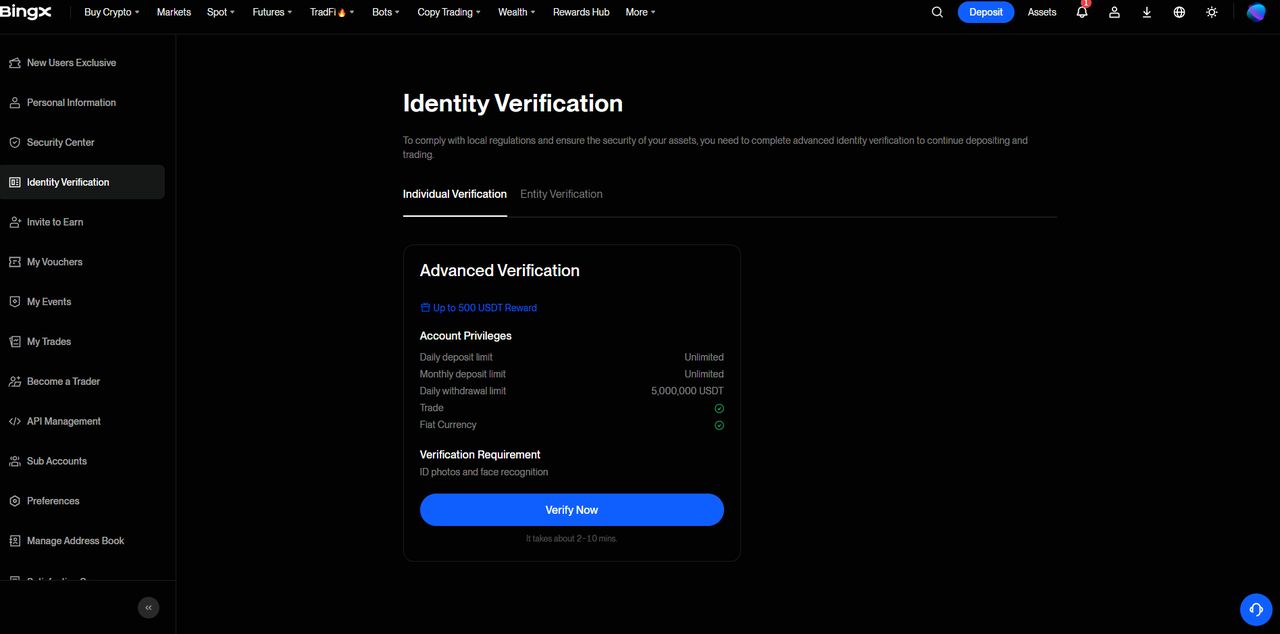
Identity verification (KYC)
ID photo plus face recognition, done in BingX's own flow — tvhook has no part in this and never sees the documents. BingX states 2–10 minutes; in practice budget a bit more if the review queue is busy.
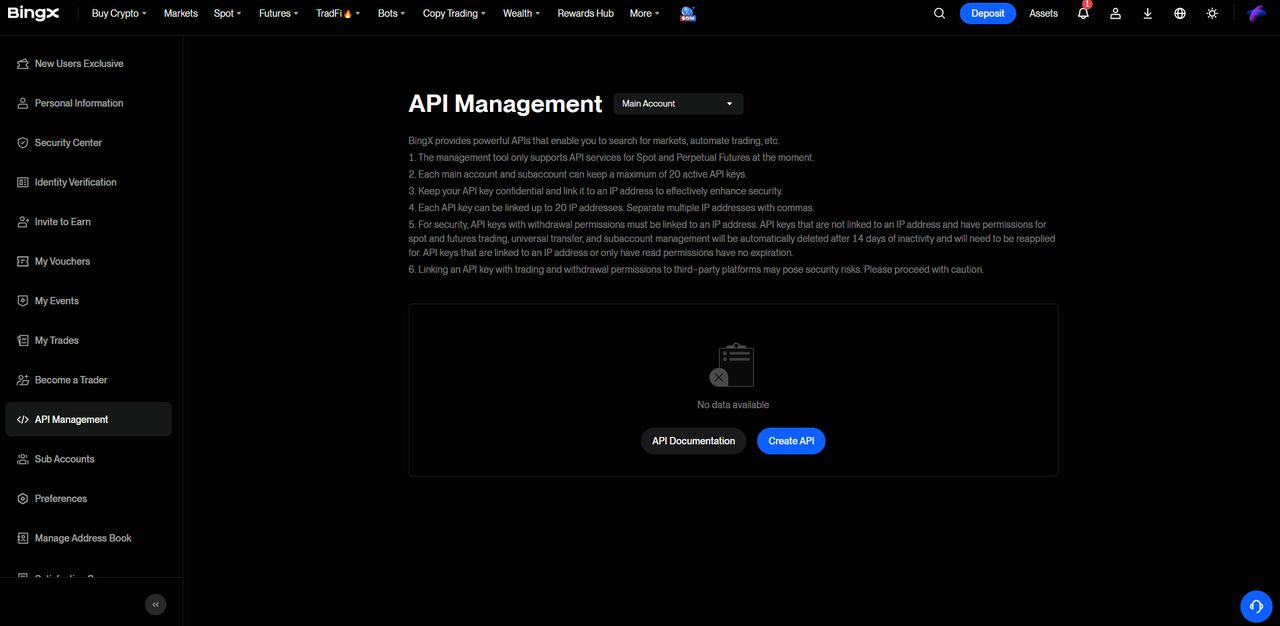
Open API Management
Left sidebar → API Management. Empty the first time — that's expected. Create API is the only button that matters here.
Create the key — and uncheck Withdraw
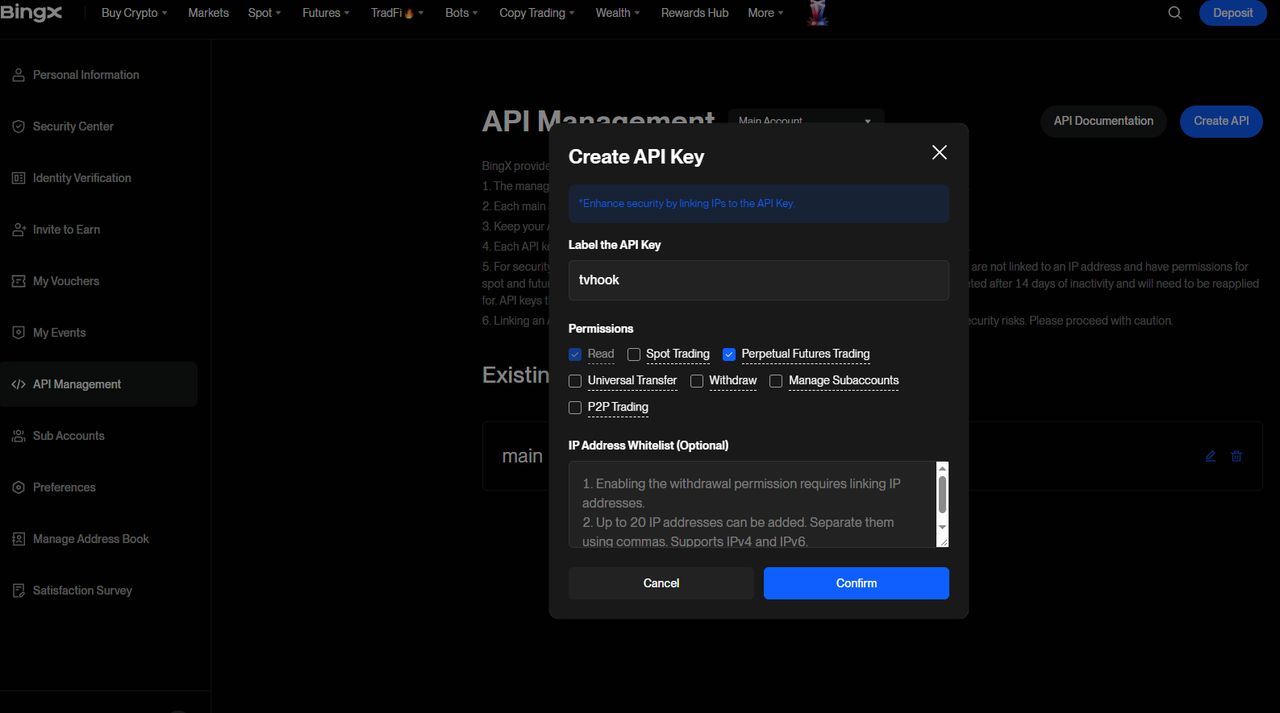
Label it anything (this one's labeled tvhook). Check Perpetual Futures Trading so the key can place orders. Leave Withdraw unchecked — tvhook refuses to save a key with withdrawal permission, so there's no reason to grant it. An IP whitelist is optional; skip it unless you already run one.
Copy both keys — the secret shows once
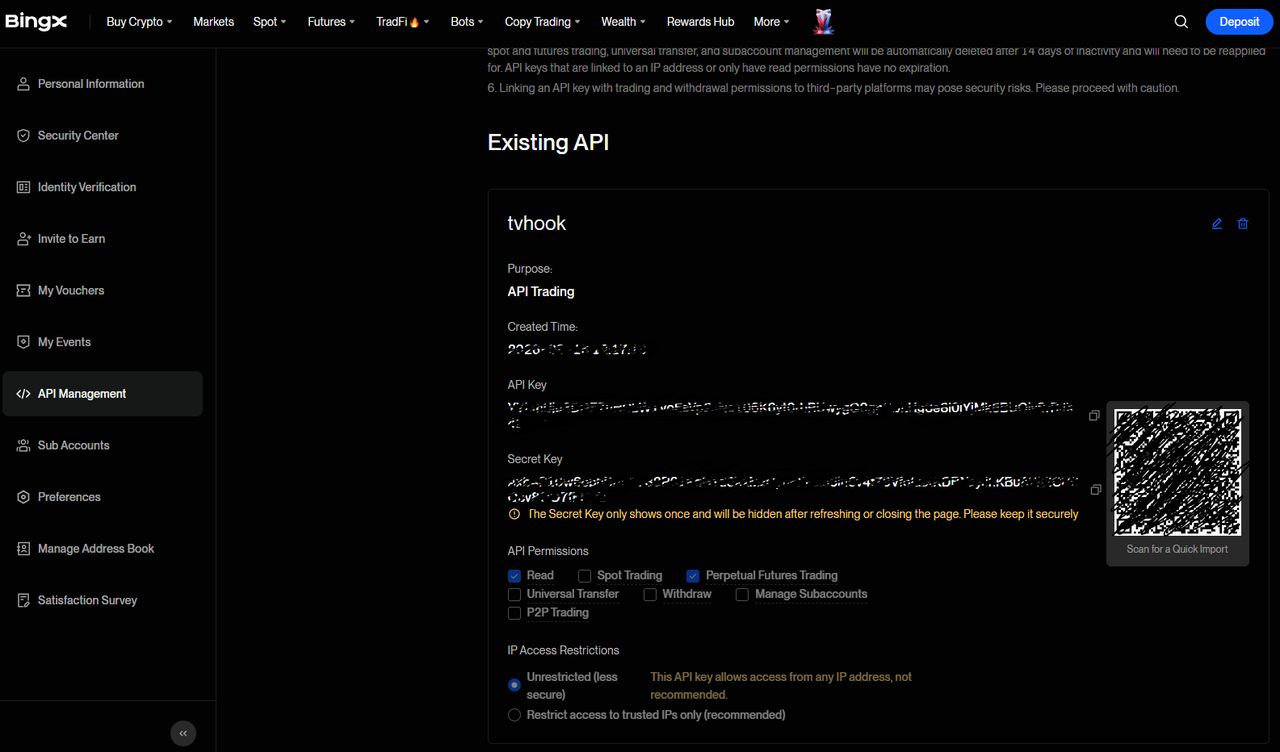
BingX shows the Access Key and Secret Key exactly once. Copy both now; if you navigate away, the secret is gone and you'll need to create a new key.
Step 2 · tvhook: size the position, issue the webhook
2단계 · tvhook
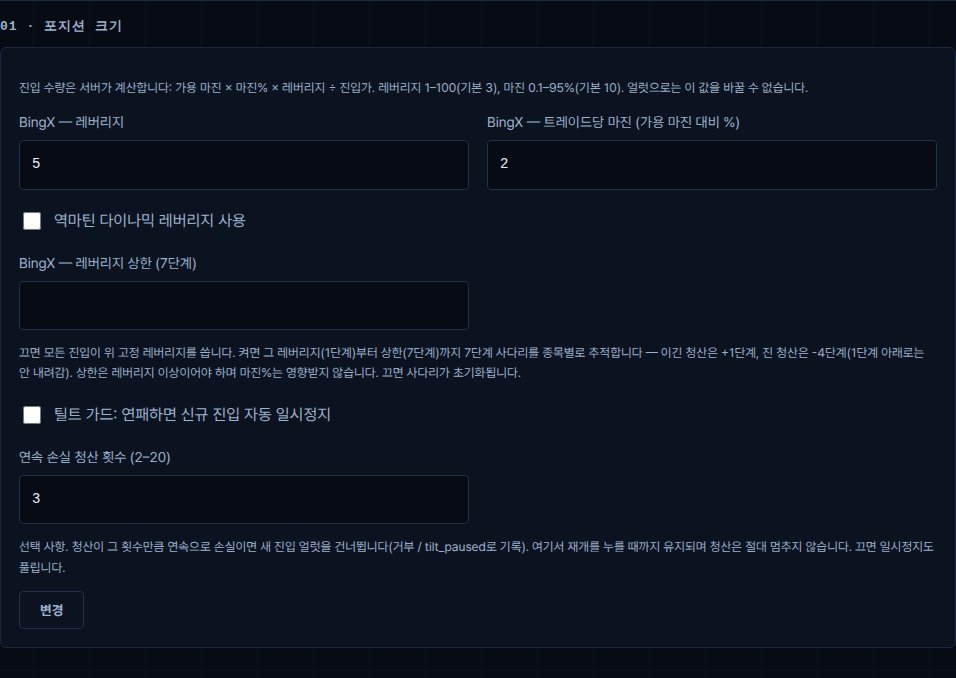
Set leverage and margin per trade
Every entry is sized on the server: total equity × margin % × leverage ÷ entry price (if free margin is short, it enters with what is free). TradingView can never override these — the alert doesn't carry a quantity field at all. Defaults are conservative; raise them once you trust the strategy, not before.
Issue your webhook URL
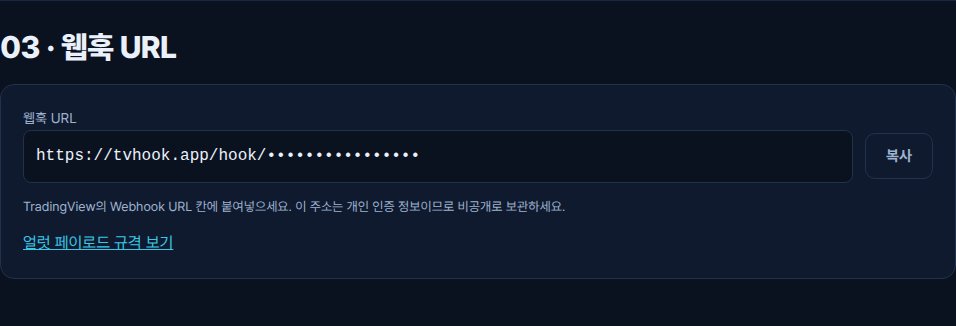
One button, once the disclaimer is accepted and a key is saved. This address is the only thing TradingView needs — copy it now, it's used in step 3 below.
Step 3 · TradingView: put a real strategy behind the alert
3단계 · 트레이딩뷰
No strategy yet? This one's real — EMA crossover, long-only by default (a checkbox flips crossunder into a short instead of just flattening), lengths and stop % are inputs (defaults 9/21 and 1%). The exit is the crossunder, not a fixed target — a trend-following cross is supposed to let winners run, so the "take-profit" input is a wide 15% safety cap, not something meant to actually fill. Paste it into Pine Editor, add it to the chart, then follow the three steps below to wire the alert to your webhook.
No symbol field to fill in, on purpose: the alert reads syminfo.ticker straight off the chart. Add the script to a BTCUSDT chart and it trades BTCUSDT; put the same script on an ETHUSDT chart and it trades that instead. One script, whatever chart it's sitting on.
//@version=6
strategy("EMA cross + tvhook", overlay=true, pyramiding=0)

// ---- tvhook.app helpers (Pine v6). Paste once, above your logic. ----
// exchange is fixed to "bingx". syminfo.ticker gives BTCUSDT / BTCUSDT.P / BINANCE:BTCUSDT — all map to BTC-USDT.
tvhook_num(float x) =>
    str.tostring(x, format.mintick)

tvhook_entry(string dir, float ep, float sl, float tp) =>
    '{"source":"TV","action":"entry","symbol":"' + syminfo.ticker + '","direction":"' + dir + '","exchange":"bingx","ep":"' + tvhook_num(ep) + '","sl":"' + tvhook_num(sl) + '","tp":"' + tvhook_num(tp) + '","alert_id":"' + str.tostring(time) + '"}'

// exit: ep/sl/tp are required by the contract but ignored; the current price fills all three.
tvhook_exit(string dir) =>
    '{"source":"TV","action":"exit","symbol":"' + syminfo.ticker + '","direction":"' + dir + '","exchange":"bingx","ep":"' + tvhook_num(close) + '","sl":"' + tvhook_num(close) + '","tp":"' + tvhook_num(close) + '","alert_id":"' + str.tostring(time) + '"}'

// Inputs — the chart's own symbol (syminfo.ticker, above) is what tvhook trades; there's
// nothing to type in for that. These five are what's actually worth tuning per market.
fastLen = input.int(9, "Fast EMA", minval=1)
slowLen = input.int(21, "Slow EMA", minval=1)
slPct = input.float(1.0, "Stop loss %", minval=0.01, step=0.1) / 100
// The real exit is the EMA crossunder below — this is not a profit target, it's a wide backstop.
// tvhook attaches tp as a real limit order on the exchange (the contract requires a tp field on
// every entry); a tight one would fill mid-trend, disagree with strategy.position_size here, and
// cap exactly the runs a trend-following cross is supposed to let ride. Keep it wide.
tpCapPct = input.float(15.0, "Take-profit safety cap % (not a target — see comment)", minval=1, step=0.5) / 100
// Off (default): crossunder just flattens, same as before. On: crossunder flips into a short
// (and a crossover while short closes the short before opening the long) — always in the market.
enableShort = input.bool(false, "Also trade shorts (flip on crossunder instead of just flattening)")

fast = ta.ema(close, fastLen)
slow = ta.ema(close, slowLen)
goLong = ta.crossover(fast, slow)
goShort = ta.crossunder(fast, slow)
slPriceLong = close * (1 - slPct)
tpPriceLong = close * (1 + tpCapPct)
slPriceShort = close * (1 + slPct)
tpPriceShort = close * (1 - tpCapPct)

// Visual only — the fill and background just make the regime readable on the chart, they
// don't feed the logic above.
fastLine = plot(fast, "Fast EMA", color.new(color.aqua, 0), 2)
slowLine = plot(slow, "Slow EMA", color.new(color.orange, 0), 2)
fill(fastLine, slowLine, fast > slow ? color.new(color.aqua, 90) : color.new(color.orange, 90))
bgcolor(strategy.position_size > 0 ? color.new(color.aqua, 94) : strategy.position_size < 0 ? color.new(color.red, 94) : na)

// Backtest orders stay unguarded so the Strategy Tester still works. Only the alert() calls are
// guarded by barstate.isrealtime: historical bars must not fire webhooks.
if goLong
    if strategy.position_size < 0
        strategy.close("S")
        if barstate.isrealtime
            alert(tvhook_exit("short"), alert.freq_once_per_bar)
    if strategy.position_size <= 0
        strategy.entry("L", strategy.long)
        if barstate.isrealtime
            alert(tvhook_entry("long", close, slPriceLong, tpPriceLong), alert.freq_once_per_bar)

if goShort
    if strategy.position_size > 0
        strategy.close("L")
        if barstate.isrealtime
            alert(tvhook_exit("long"), alert.freq_once_per_bar)
    if enableShort and strategy.position_size >= 0
        strategy.entry("S", strategy.short)
        if barstate.isrealtime
            alert(tvhook_entry("short", close, slPriceShort, tpPriceShort), alert.freq_once_per_bar)
Wire the alert
Add the script to the chart, then open Alerts and create an alert on it (not on the symbol).
Condition: pick the script and choose "Any alert() function call" — the Message box is ignored; alert() supplies the JSON.
Notifications: enable Webhook URL and paste https://tvhook.app/hook/<token> from your console. Expiration: open-ended.
Paste this into ChatGPT, Claude or Gemini and it adds tvhook entry and exit alerts to your strategy.
Read the spec at https://tvhook.app/llms.txt, then add tvhook entry and exit alerts to my TradingView strategy below. Give me the full edited code.

[paste your Pine Script here]
If the AI cannot open links, copy the spec below and paste it in as well. Spec for AI (llms.txt)
That's the whole setup
BingX key saved, webhook issued, TradingView firing at it. From the next alert on, it fills itself.
BingX and TradingView screens follow each product's own flow and may change as they ship updates. The strategy above is a plain, unoptimized example for wiring the alert — not a recommendation. tvhook guarantees no returns.