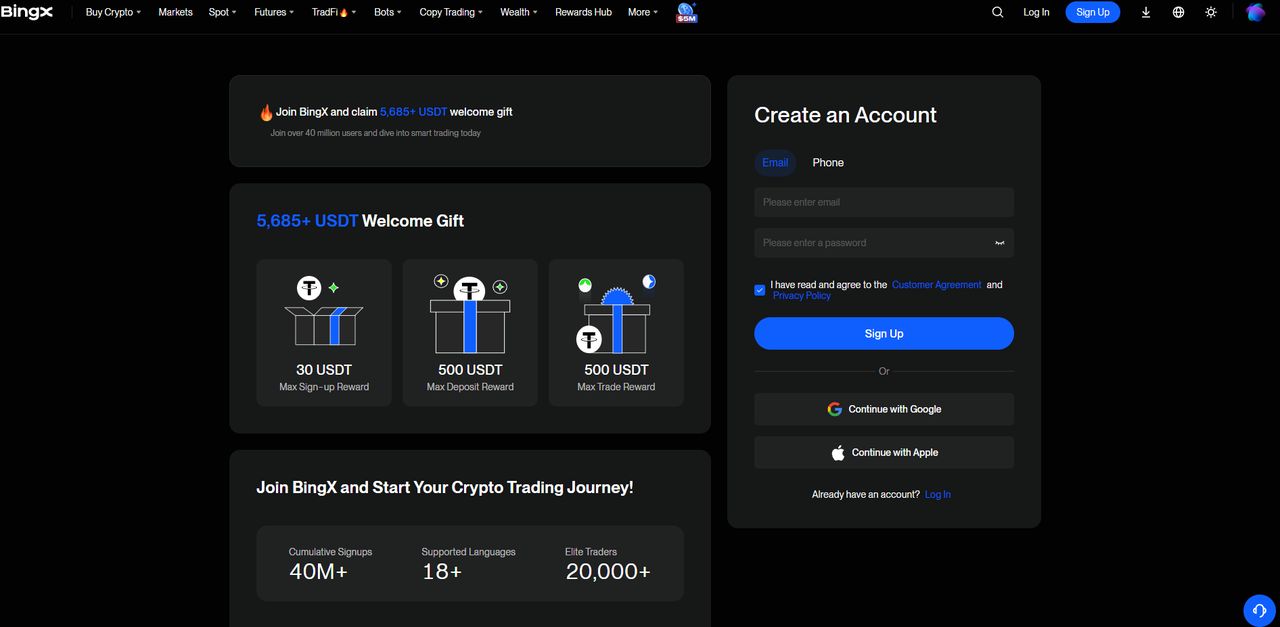
tvhook 레퍼럴 링크를 누르면 BingX 가입 화면으로 바로 연결됩니다. 이메일이든 Google/Apple이든 상관없어요. 이 링크로 가입하는 것 자체가 웹훅 자동매매 무료 + 선물 수수료 10% 할인의 조건입니다 — 따로 신청할 게 없어요.
세 칸 중 진짜 필요한 건 하나
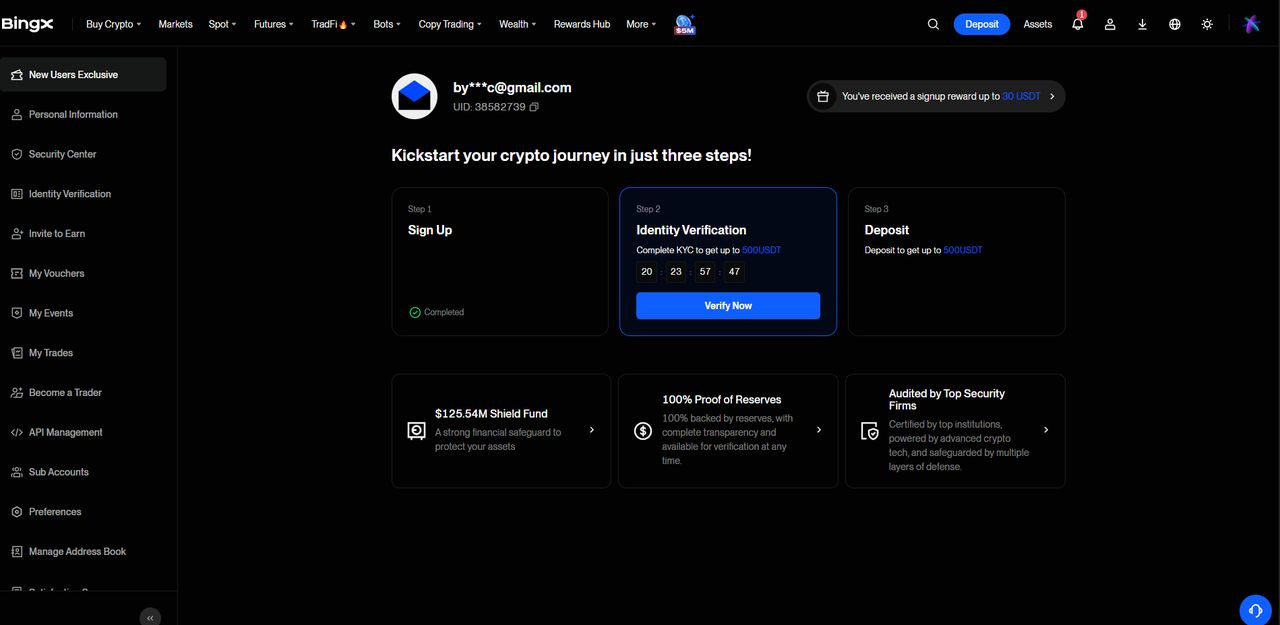
가입 직후 Sign Up(완료) · Identity Verification · Deposit 세 단계가 뜹니다. Deposit은 실제로 입금할 때 하면 되고, Identity Verification은 미루면 안 됩니다 — 이거 없이는 API 거래 자체가 안 열립니다.
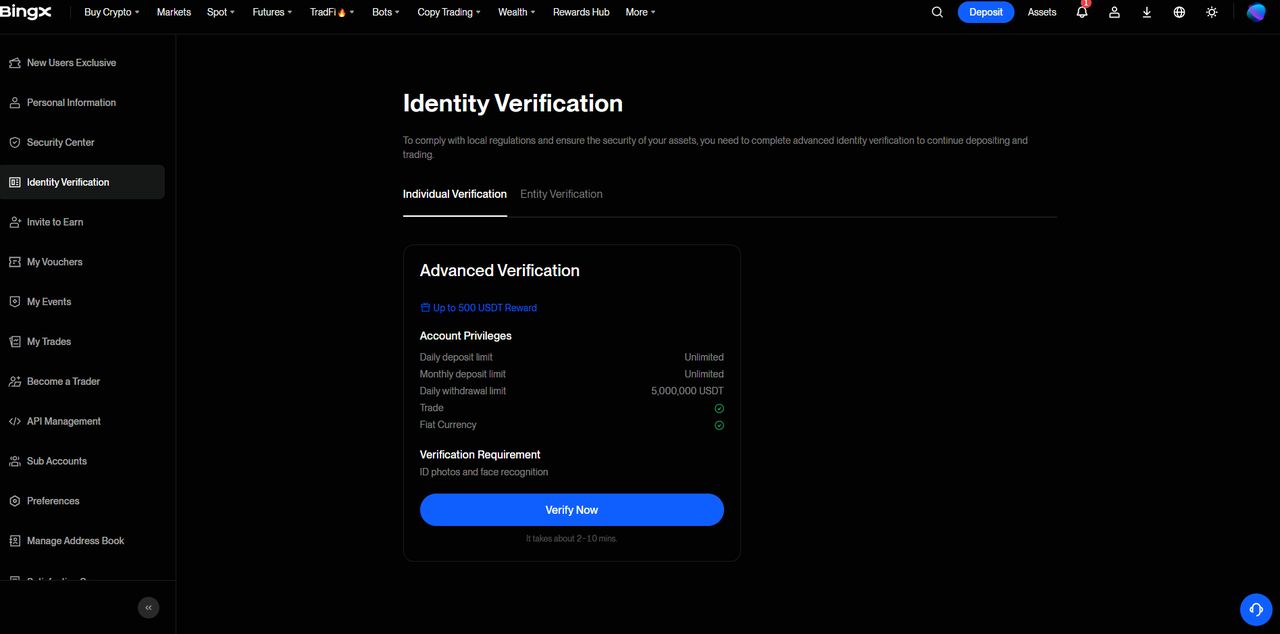
신원인증(KYC)
신분증 사진 + 얼굴인식, BingX 자체 화면에서 진행됩니다 — tvhook은 이 과정에 관여하지 않고 서류도 보지 않습니다. BingX 안내는 2~10분이지만, 심사가 몰리는 시간대면 조금 더 걸릴 수 있습니다.
API Management 진입
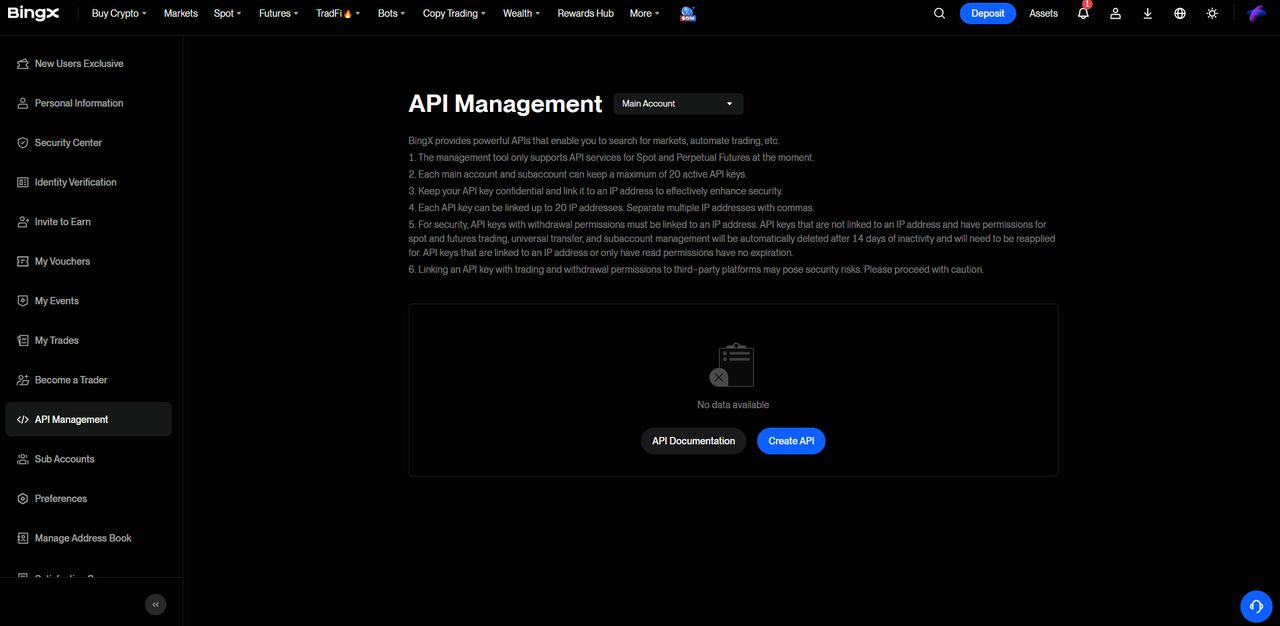
왼쪽 메뉴 → API Management. 처음엔 목록이 비어있는 게 정상입니다. 여기서 누를 건 Create API 하나뿐.
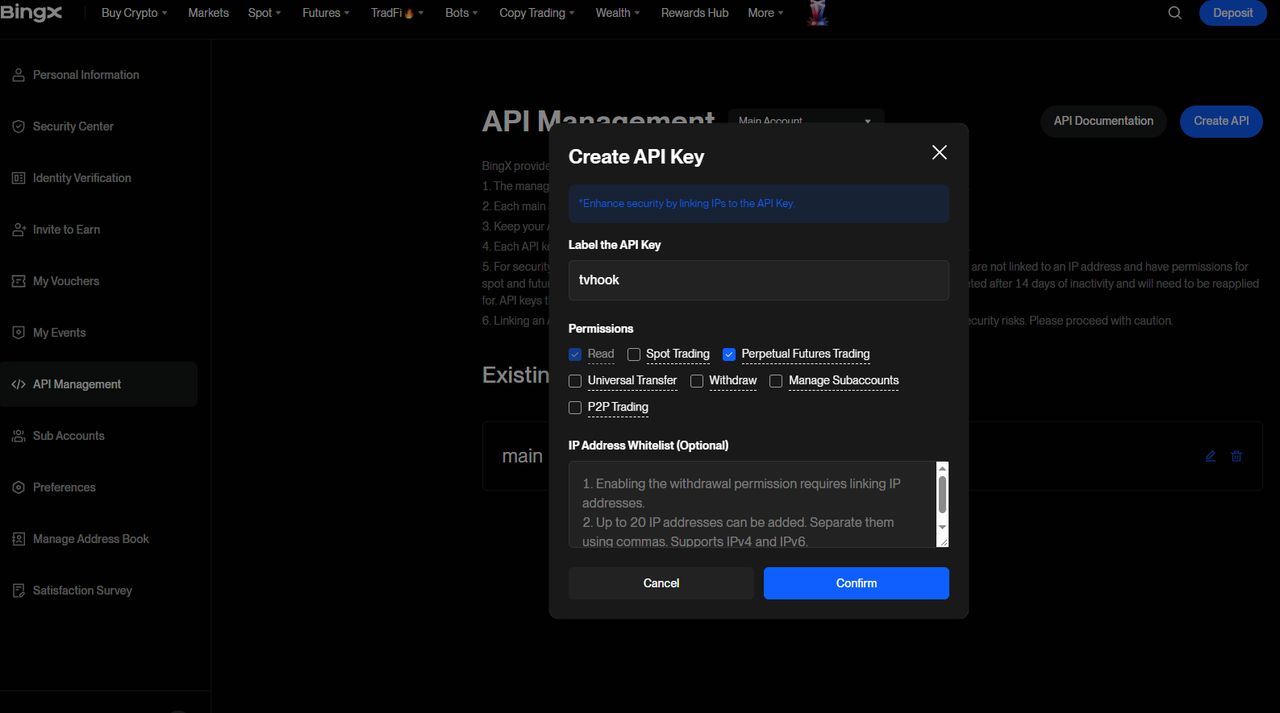
키 생성 — Withdraw는 반드시 해제
이름은 아무거나 상관없습니다(사진은 tvhook으로 등록). Perpetual Futures Trading을 체크해야 주문이 나갑니다. Withdraw는 체크하지 마세요 — 출금 권한이 있는 키는 tvhook이 저장 자체를 거부하니 애초에 줄 이유가 없습니다. IP 화이트리스트는 선택사항, 이미 쓰고 있는 게 아니면 건너뛰어도 됩니다.
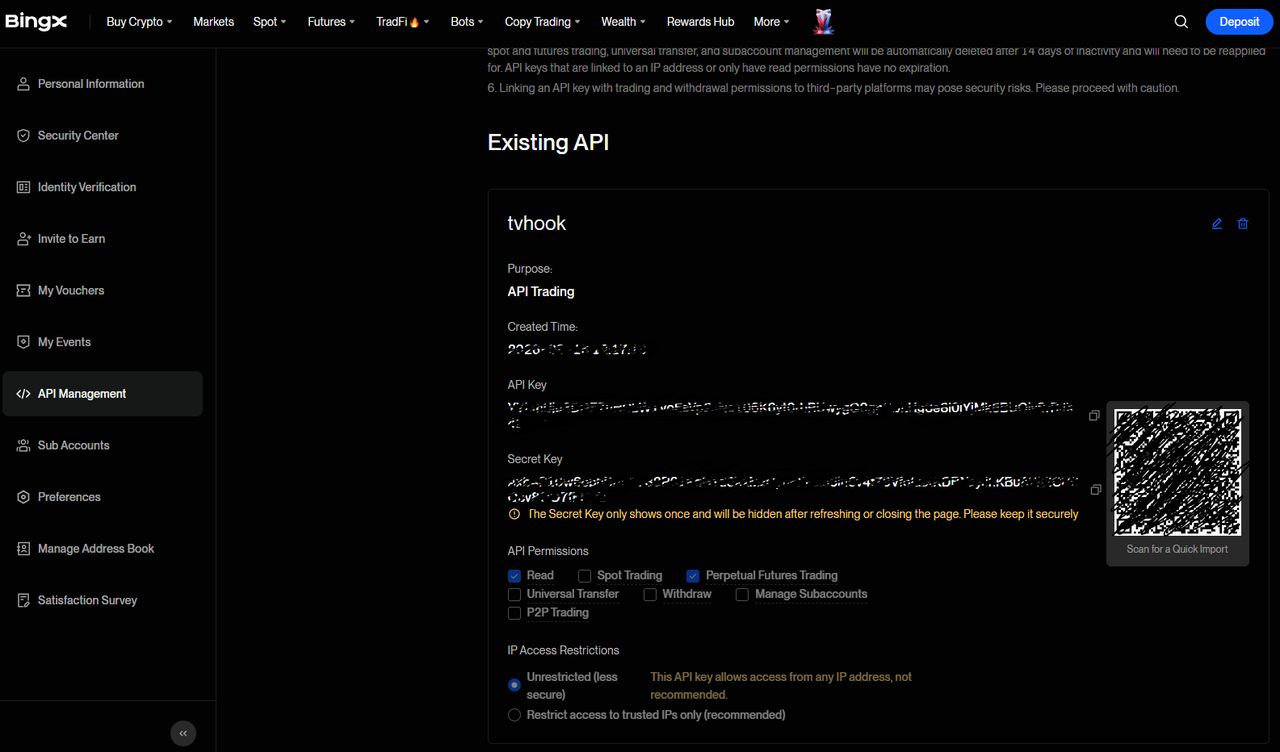
키 두 개 모두 복사 — 시크릿은 한 번만 보임
Access Key와 Secret Key가 이 화면에서 딱 한 번 노출됩니다. 지금 둘 다 복사해두세요 — 페이지를 벗어나면 시크릿 키는 다시 못 보고, 새로 발급해야 합니다.
Step 2 · tvhook: size the position, issue the webhook
2단계 · tvhook
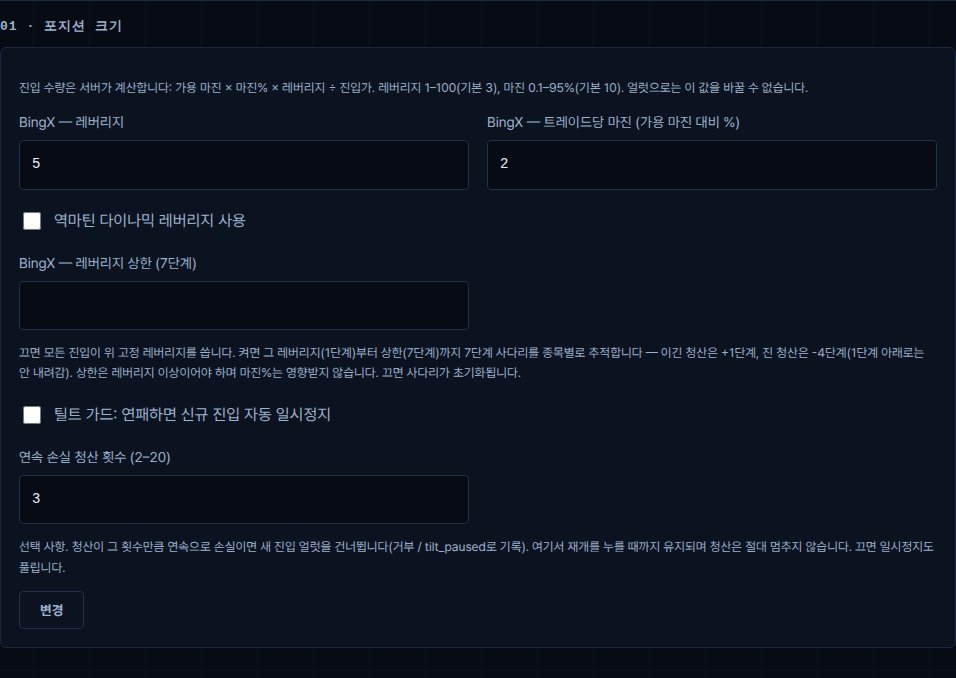
레버리지·트레이드당 마진 설정
진입 수량은 서버가 계산합니다: 총자산 × 마진% × 레버리지 ÷ 진입가 (가용 마진이 모자라면 남은 만큼만 진입). 트레이딩뷰 알림은 애초에 수량 필드 자체가 없어서 이 값을 절대 못 바꿉니다. 기본값은 보수적으로 잡혀 있어요 — 전략을 믿게 된 다음에 올리세요, 먼저가 아니라.
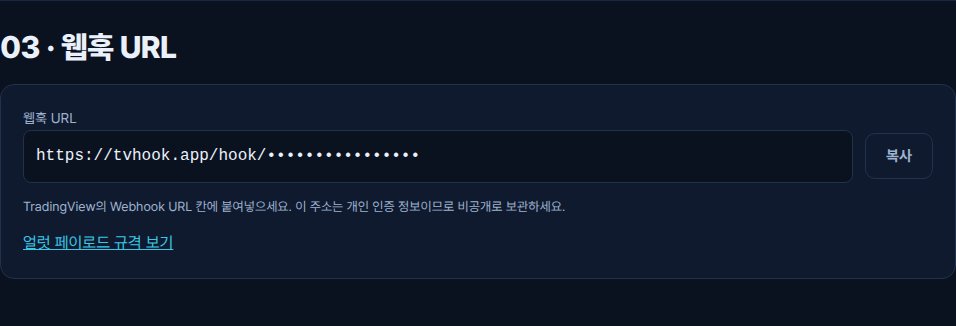
웹훅 주소 발급
면책 동의하고 키 저장하면 버튼 하나. 이 주소가 트레이딩뷰에 필요한 전부입니다 — 지금 복사해두면 바로 아래 3단계에서 씁니다.
Step 3 · TradingView: put a real strategy behind the alert
3단계 · 트레이딩뷰
아직 전략이 없으신가요? 이건 실제로 돌아가는 예시입니다 — EMA 크로스, 기본은 롱 온리지만 체크박스 하나로 데드크로스 때 그냥 청산 대신 숏으로 전환되게 할 수 있어요. 이평선 길이와 손절%는 인풋박스(기본 9/21·1%). 출구는 고정 목표가가 아니라 크로스언더입니다 — 추세추종은 원래 이익을 최대한 끌고 가는 게 목적이라, "익절" 인풋은 실제로 체결시키려는 값이 아니라 15%짜리 넓은 안전판이에요. Pine 에디터에 붙여넣고 차트에 추가한 다음, 아래 3단계대로 알림을 웹훅에 연결하세요.
심볼 입력칸이 따로 없는 건 의도한 거예요 — 알림이 차트에서 syminfo.ticker를 그대로 읽습니다. BTCUSDT 차트에 스크립트를 걸면 BTCUSDT를 매매하고, 같은 스크립트를 ETHUSDT 차트에 걸면 그걸 매매합니다. 스크립트 하나로 어느 차트에 올리느냐만 다르면 됩니다.
//@version=6
strategy("EMA cross + tvhook", overlay=true, pyramiding=0)

// ---- tvhook.app helpers (Pine v6). Paste once, above your logic. ----
// exchange is fixed to "bingx". syminfo.ticker gives BTCUSDT / BTCUSDT.P / BINANCE:BTCUSDT — all map to BTC-USDT.
tvhook_num(float x) =>
    str.tostring(x, format.mintick)

tvhook_entry(string dir, float ep, float sl, float tp) =>
    '{"source":"TV","action":"entry","symbol":"' + syminfo.ticker + '","direction":"' + dir + '","exchange":"bingx","ep":"' + tvhook_num(ep) + '","sl":"' + tvhook_num(sl) + '","tp":"' + tvhook_num(tp) + '","alert_id":"' + str.tostring(time) + '"}'

// exit: ep/sl/tp are required by the contract but ignored; the current price fills all three.
tvhook_exit(string dir) =>
    '{"source":"TV","action":"exit","symbol":"' + syminfo.ticker + '","direction":"' + dir + '","exchange":"bingx","ep":"' + tvhook_num(close) + '","sl":"' + tvhook_num(close) + '","tp":"' + tvhook_num(close) + '","alert_id":"' + str.tostring(time) + '"}'

// Inputs — the chart's own symbol (syminfo.ticker, above) is what tvhook trades; there's
// nothing to type in for that. These five are what's actually worth tuning per market.
fastLen = input.int(9, "Fast EMA", minval=1)
slowLen = input.int(21, "Slow EMA", minval=1)
slPct = input.float(1.0, "Stop loss %", minval=0.01, step=0.1) / 100
// The real exit is the EMA crossunder below — this is not a profit target, it's a wide backstop.
// tvhook attaches tp as a real limit order on the exchange (the contract requires a tp field on
// every entry); a tight one would fill mid-trend, disagree with strategy.position_size here, and
// cap exactly the runs a trend-following cross is supposed to let ride. Keep it wide.
tpCapPct = input.float(15.0, "Take-profit safety cap % (not a target — see comment)", minval=1, step=0.5) / 100
// Off (default): crossunder just flattens, same as before. On: crossunder flips into a short
// (and a crossover while short closes the short before opening the long) — always in the market.
enableShort = input.bool(false, "Also trade shorts (flip on crossunder instead of just flattening)")

fast = ta.ema(close, fastLen)
slow = ta.ema(close, slowLen)
goLong = ta.crossover(fast, slow)
goShort = ta.crossunder(fast, slow)
slPriceLong = close * (1 - slPct)
tpPriceLong = close * (1 + tpCapPct)
slPriceShort = close * (1 + slPct)
tpPriceShort = close * (1 - tpCapPct)

// Visual only — the fill and background just make the regime readable on the chart, they
// don't feed the logic above.
fastLine = plot(fast, "Fast EMA", color.new(color.aqua, 0), 2)
slowLine = plot(slow, "Slow EMA", color.new(color.orange, 0), 2)
fill(fastLine, slowLine, fast > slow ? color.new(color.aqua, 90) : color.new(color.orange, 90))
bgcolor(strategy.position_size > 0 ? color.new(color.aqua, 94) : strategy.position_size < 0 ? color.new(color.red, 94) : na)

// Backtest orders stay unguarded so the Strategy Tester still works. Only the alert() calls are
// guarded by barstate.isrealtime: historical bars must not fire webhooks.
if goLong
    if strategy.position_size < 0
        strategy.close("S")
        if barstate.isrealtime
            alert(tvhook_exit("short"), alert.freq_once_per_bar)
    if strategy.position_size <= 0
        strategy.entry("L", strategy.long)
        if barstate.isrealtime
            alert(tvhook_entry("long", close, slPriceLong, tpPriceLong), alert.freq_once_per_bar)

if goShort
    if strategy.position_size > 0
        strategy.close("L")
        if barstate.isrealtime
            alert(tvhook_exit("long"), alert.freq_once_per_bar)
    if enableShort and strategy.position_size >= 0
        strategy.entry("S", strategy.short)
        if barstate.isrealtime
            alert(tvhook_entry("short", close, slPriceShort, tpPriceShort), alert.freq_once_per_bar)
알림 연결하기
차트에 스크립트를 추가한 다음, 트레이딩뷰의 얼러트(알림) 버튼을 눌러 그 스크립트에 얼러트를 만드세요. 종목이 아니라 스크립트에 만들어야 합니다.
조건: 방금 추가한 스크립트를 고르고 "모든 alert() 함수 호출"을 선택하세요 — 메시지 칸은 무시되고, alert()가 JSON을 직접 채웁니다.